The planning board is where a whole production is scheduled, before or alongside the actual translation and lettering work. It turns "we have these chapters and these people" into "here is who does what, and by when," sized by how fast each person actually works.
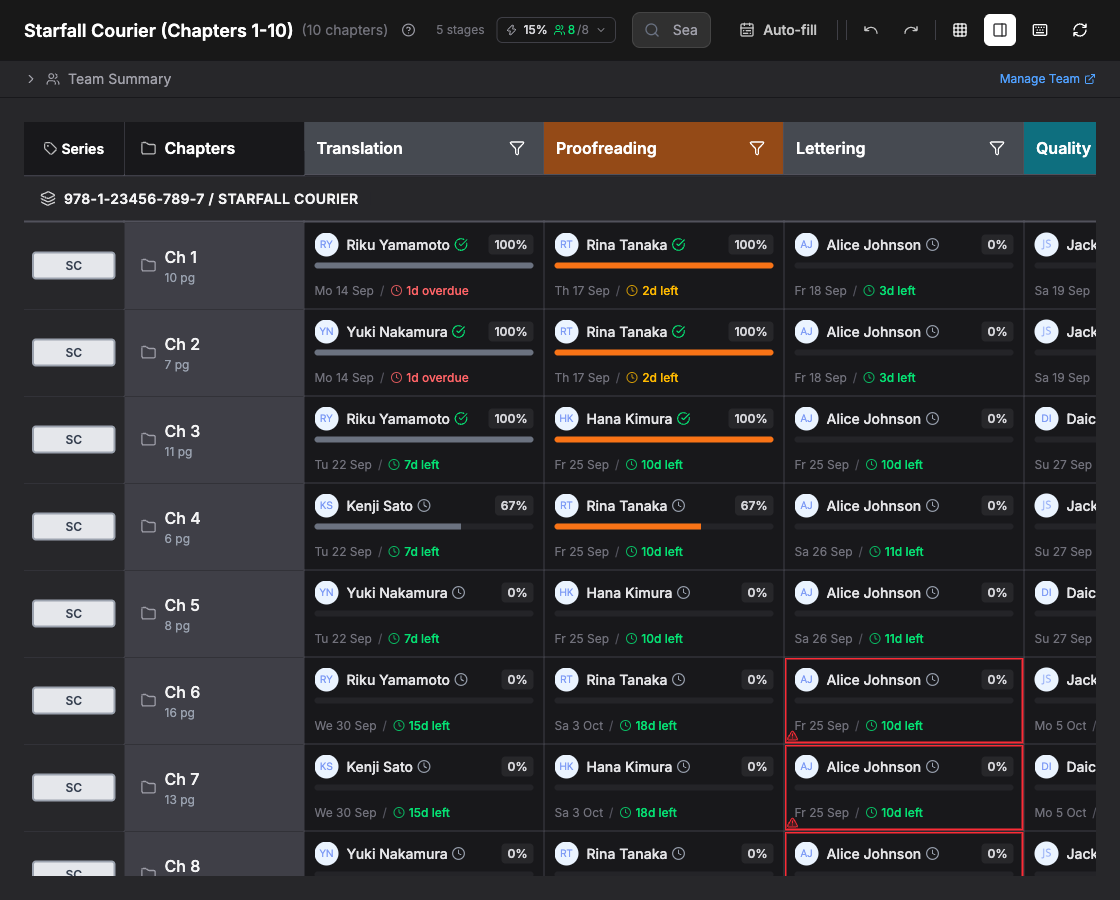
The board at a glance
The board is a grid. Down the left are your series and chapters. Across the top are your pipeline stages in order, for example translation, proofreading, lettering, quality check and delivery. Every cell where a chapter meets a stage is one task: a piece of work for one person, with an assignee, a progress bar and a due date.
The left-hand columns stay fixed while you scroll the stages sideways, so a chapter never loses its label.
Tasks, assignees and dates
Assign a person to a task and Zfuro works out how long it should take from the number of pages in the chapter and that person's real throughput for that kind of work and language pair. A translator and a letterer do not work at the same speed, so the same chapter produces different windows at different stages.
Zfuro also respects each person's calendar: weekends, company holidays and their own booked leave. A due date never lands on a day the assigned person does not work.
Capacity-aware scheduling
The point of the board is that the plan reflects reality, not wishes:
- Sized by real capacity. Every task window comes from the assigned person's pages per day, not a flat guess.
- One person, one workload. If someone both translates and quality-checks, Zfuro treats them as a single worker moving through their tasks in turn, so they are never double-booked.
- Overload is visible. If a plan asks more of someone than they can do in the time available, that shows up as a clear signal rather than being quietly hidden.
Stage gating: downstream waits for upstream
Proofreading cannot start on a chapter until translation is done, and lettering cannot start until the pages are clean. Zfuro enforces this: a downstream stage is never scheduled to begin before the stage before it has finished. This is what stops a letterer being booked to start on a day the pages will not actually be ready, and what keeps the board honest when an upstream task slips.
Deadlines from your delivery date
Set a delivery date for the project and Zfuro derives the per-stage due dates that lead up to it, in pipeline order. If a stage would land after your delivery date, the board warns you, so you can rebalance before you commit rather than discover it late.
Editing the plan
You can let Zfuro fill the whole board for you with auto-fit, or hand-tune any cell. Changing one date can cascade the dates that depend on it, so a single edit keeps the rest of the chapter consistent.
Read-only states
A board can be read-only, for example when a project is not in an editable state or your access is limited. When that happens Zfuro shows a banner explaining why, so it is clear the plan is being shown for reference rather than for editing.
Next steps
More planning guides (auto-fit scheduling, reading the capacity panel, stage gating, freelancer commitments) are on the way.